


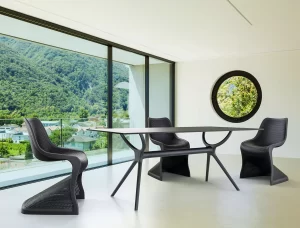

Best Tables for Shared Offices in Australia

A shared office can look organised at 9 am and feel overcrowded by 10.30. The right table changes that. The best tables for shared offices give people enough personal workspace, support quick collaboration and keep walkways clear, without locking your floorplan into one rigid way of working.
For office managers, fit-out teams and growing businesses, the decision is not simply round versus rectangular. Table shape, leg design, surface durability, power access and mobility all affect how comfortably teams work each day. A considered mix of shared work tables, meeting tables and touchdown surfaces will usually deliver better value than filling every available metre with identical desks.
Start with how the office is actually used
Before choosing finishes or table sizes, look at the activity the space needs to support. A creative studio may need large communal surfaces for samples, laptops and project reviews. A professional services office may need focused bench-style workstations alongside a formal meeting table. In a co-working environment, flexibility is often the priority, with different users arriving throughout the day.
A table that suits a two-person project team may be too small for a six-person planning session. Equally, a large boardroom table can consume valuable floor area if it is only used for occasional meetings. Matching the table to the task protects both your budget and your usable workspace.
It is also worth separating permanent work from short-term work. Staff who spend most of the day at one location need a desk-height surface with suitable ergonomic seating, cable management and enough depth for monitors. Casual users may only need a compact touchdown table near a breakout area, reception zone or office pod.
The best tables for shared offices by use case
Shared work tables for everyday teams
Large rectangular work tables are a practical choice for teams that sit together daily. They use floor space efficiently, are simple to position in rows or pods, and create a clear shared zone without the visual weight of multiple enclosed workstations.
For laptop-based work, allow enough depth for a screen, keyboard, notebook and personal items. A shallower table may work for hot-desking, but permanent users will appreciate a more generous work surface. Consider the space between seated staff as well. Crowding people together can make an office feel busy before the day has properly started.
Bench-style tables work particularly well in open-plan offices. Their clean lines suit contemporary fit-outs, and central cable trays or integrated power options can help manage technology without cords trailing across the floor. Add modest desk screens where visual separation or acoustic control is needed, rather than building unnecessary barriers across the whole office.
Meeting tables for decision-making spaces
A meeting table needs to do more than fit a certain number of chairs. It should allow people to see one another, share documents and connect devices without the room becoming cluttered. Rectangular tables make efficient use of narrow meeting rooms, while round and boat-shaped designs encourage more equal participation around the table.
A round table is often an excellent solution for informal meetings of four to six people. There is no obvious head position, which can make it feel less formal, and the curved shape softens compact rooms. For larger groups, a rectangular or modular meeting table generally provides more usable surface area and easier access to power.
Allow room for chairs to move back comfortably and for people to pass behind them. A meeting room that technically seats eight but only functions well for six creates frustration at every booking. If the room also hosts video calls, make sure the table position gives all participants a clear line of sight to the screen or camera.
Mobile tables for flexible layouts
Training sessions, project workshops and hybrid events place different demands on a room. Mobile tables with lockable castors let staff rearrange the layout without waiting for a facilities team. They can be grouped for collaborative work, separated for focused sessions or moved aside to clear a presentation area.
This flexibility comes with a trade-off. Mobile designs can have less visual permanence than a fixed boardroom table, and low-quality castors may feel unstable or mark flooring. For commercial use, choose sturdy frames, reliable locks and table tops that can handle regular movement. Folding tables are useful where storage is available, but check the folded footprint before ordering.
Breakout and touchdown tables
Shared offices need places for the conversations that do not require a booked meeting room. High bar tables, café-height tables and compact round tables can turn underused corners into productive breakout areas. They suit quick stand-up meetings, casual laptop work and informal catch-ups between staff.
These tables should complement, not replace, ergonomic workstations. A high table is ideal for a 15-minute conversation or a change of scenery, but it is rarely the right setting for sustained screen work. Pair table height carefully with stools or chairs so users sit comfortably and the overall area feels cohesive.
Get size and clearance right before ordering
Room measurements should guide the table choice, not the other way around. Start by marking door swings, windows, storage, power points and circulation paths. Then map the proposed table footprint, including chairs pulled out from the edge.
As a practical guide, allow around 600 mm of table width per seated person for laptop work, with more room where staff use paperwork, dual monitors or large samples. For shared desks, a depth of 700 to 800 mm is often more comfortable than a compact café-style surface. Larger meeting tables may need 900 mm or more of depth to accommodate devices and documents from both sides.
Keep main walkways clear enough for people to pass without squeezing behind seated colleagues. Accessibility also matters. Leave adequate circulation around shared tables for staff and visitors using mobility aids, and avoid creating dead ends in busy office zones.
A simple floorplan test can prevent costly mistakes. Use masking tape on site to mark the planned table size and chair positions, then walk through the space at a busy time. It quickly reveals whether the layout supports natural movement or creates a bottleneck near printers, kitchens and entry points.
Choose commercial materials that suit the workload
Office tables need to look professional, but they also need to tolerate daily use. Commercial-grade laminate tops are a sensible option for many workplaces because they are durable, easy to clean and available in a broad range of timber-look, white and neutral finishes. They suit shared work zones where spills, bags and regular laptop use are expected.
Timber veneer offers warmth and a more premium look for client-facing meeting rooms, executive spaces and refined hospitality-style offices. It does require more care than laminate, so it is best selected where the visual finish justifies the maintenance commitment.
Powder-coated steel frames are a reliable commercial choice, offering strength and a clean contemporary profile. A black frame can add definition to pale interiors, while white or light neutral frames help smaller rooms feel more open. In either case, inspect the base design. Pedestal and sled bases can maximise legroom, while four-legged tables may offer a familiar, stable look at a sharper price point.
Do not treat power and cable management as an afterthought
A shared table without convenient charging becomes a temporary solution quickly. Staff will run leads to wall outlets, creating trip hazards and visual clutter. For permanent shared work tables and meeting tables, plan power access at the same time as the furniture layout.
In-floor boxes, under-table cable trays and integrated power modules each suit different fit-outs. The right option depends on whether tables are fixed in place, whether the floor can be modified and how frequently the layout may change. For flexible spaces, power modules positioned nearby may be more practical than hard-wiring every table.
Cable management also protects the appearance of an otherwise polished office. When screens, chargers and conferencing equipment are contained, the room is easier to clean, easier to reconfigure and more credible when clients visit.
Create a coordinated mix rather than a one-table office
The most effective shared offices usually combine several table types. A main shared workstation supports focused daily work, a meeting table gives teams a place to gather, and smaller breakout tables provide choice throughout the day. Using complementary finishes across these zones creates visual consistency without making every room look identical.
This is where a commercial furniture supplier can simplify procurement. Selecting tables, seating, storage and workstations from a coordinated range helps maintain proportions, colours and material finishes across the fit-out. Furniture Pro Australia can support this approach with commercial furniture options held for practical business upgrades, backed by delivery and after-sales service considerations that matter when timelines are tight.
The right shared-office table is one that earns its footprint. Choose tables around the work your people need to do, allow space for movement and technology, and invest in materials built for everyday commercial use. A well-planned table layout makes the office easier to work in now and easier to adapt when the team changes.