



Open Plan Workstation Example for Modern Offices
A good open plan workstation example does more than place several desks in a row. It gives every employee enough room to work comfortably, keeps cables and paperwork under control, supports day-to-day collaboration and still presents a polished, professional office. For office managers, fit-out teams and business owners, the right setup turns valuable floor space into a productive, adaptable workplace.
The most effective open-plan offices are planned around the work being done, not simply the number of seats required. A sales team making frequent calls has different needs from a focused accounts team, while a growing business needs furniture that can be reconfigured without starting again from scratch. Desk size, circulation space, privacy, storage and power access all need to work together.
An open plan workstation example that works
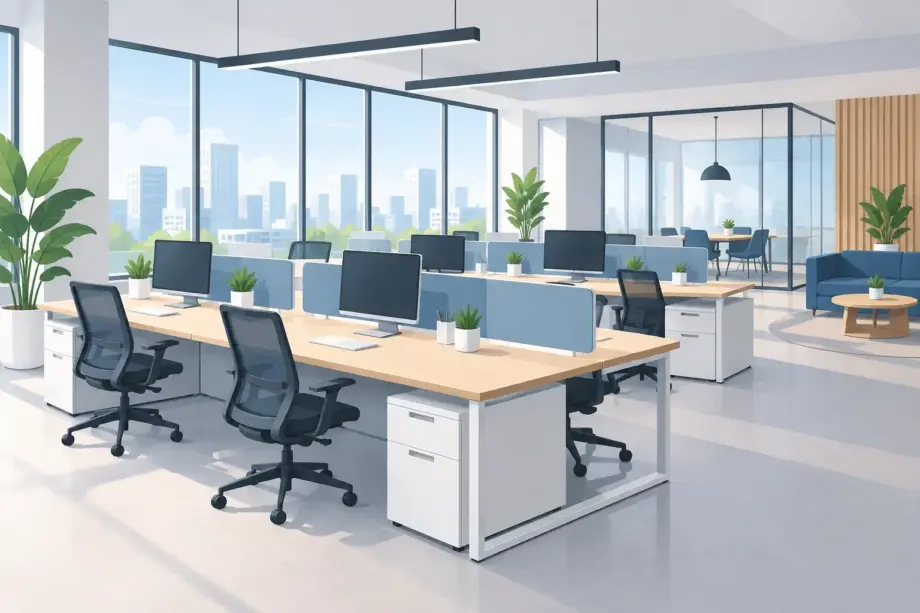
Consider a 12-person office in a rectangular tenancy. Rather than lining desks around every wall, the room is organised into two six-person workstation pods. Each pod uses three double-sided desk modules, creating a clean benching layout with six seats facing one another. A central aisle separates the pods, while wider circulation routes run around the outside so staff can reach storage, meeting rooms and exits without passing directly behind seated colleagues.
Each workstation is approximately 1500 mm wide and 750 mm deep. This gives staff practical room for a monitor, keyboard, laptop dock, notebook and personal items without the desktop becoming crowded. In roles where employees regularly work with two large screens, increasing the depth to 800 mm may be worthwhile. Compact desk depths can look efficient on a floor plan, but they often create an uncomfortable working position once monitor arms, cables and documents are added.
Low shared desk-mounted screens provide visual separation between opposite-facing users. They reduce distraction and create a little personal territory without blocking light or making the room feel enclosed. Along the back wall, a bank of lockable mobile pedestals and low credenzas holds personal belongings, stationery, printer paper and shared equipment. This keeps the workstations clear while ensuring frequently used items remain close by.
At one end of the room, a small round meeting table supports quick conversations that would otherwise happen at a desk. At the other, a pair of acoustic office pods or high-back lounge seats gives staff somewhere to take a private call. The workstation zone remains open and collaborative, while tasks requiring concentration or discretion have a more suitable setting.
Start with workflow, not desk numbers
The first question in an office fit-out should be how people use the space during a normal week. Teams that frequently share screens, pass samples or discuss live work may benefit from grouped workstations. Employees handling confidential calls, detailed reports or customer data may need stronger acoustic separation, designated quiet areas or a hybrid layout with enclosed rooms.
A workstation plan also needs to account for movement. Staff should be able to leave a chair, access storage and walk through the office without creating bottlenecks. Aisles that appear adequate when the office is empty can quickly become tight when chairs are pulled out, delivery boxes arrive or several people move between meetings.
It is also worth allowing for visitors, cleaners and future recruitment. Filling every square metre with desks may maximise seat count, but it can make the office feel temporary and difficult to manage. A considered layout leaves room for shared furniture, indoor greenery, technology and the everyday activity that makes an office functional.
Choose workstation dimensions for the task
There is no single correct desk size. A reception-adjacent administration team using laptops may work well at a compact station, while designers, estimators and operations staff often need larger surfaces. The key is matching the workstation to the equipment and documents used every day.
For many commercial offices, a 1200 mm to 1500 mm wide workstation is a practical starting point. Wider stations improve personal space and reduce clutter, but the additional footprint needs to be balanced against overall capacity. Desk depth is equally important. A deeper top creates better viewing distance from monitors and allows cables, docking stations and accessories to sit behind the work zone.
Height-adjustable desks are a strong option where staff work long hours at screens or where a business wants greater flexibility across shared desks. They cost more than fixed-height benches, so they are often best prioritised for high-use roles, hot-desking zones or employees with specific ergonomic requirements.
Build in privacy without closing the room
Open-plan workstations can become noisy and visually busy. Privacy screens, acoustic panels and modesty panels help manage this, but the right level depends on the team. High partitions may reduce distraction, yet they can also limit sightlines and make collaboration less natural. Lower screens maintain openness while giving users enough separation for focused work.
Material selection matters too. Fabric acoustic screens can soften sound and introduce colour into a neutral office palette. Melamine or laminate screens are easier to wipe down and suit clean, streamlined commercial interiors. For customer-facing professional services offices, a restrained palette of timber-look finishes, black frames and upholstered acoustic elements can create a more refined impression without sacrificing durability.
Power, cable management and storage are part of the furniture plan
A visually tidy office is usually the result of practical infrastructure. Every shared workstation should have a clear plan for power, charging and data. Under-desk cable baskets, cable trays, grommets and centrally positioned power modules prevent cords from running across floors or collecting around chair bases. This improves both presentation and workplace safety.
Avoid relying on power boards and extension leads as a permanent solution. They are difficult to manage, make cleaning harder and can quickly undermine an otherwise well-finished fit-out. Plan desk locations around existing floor boxes or engage the appropriate trades where new power access is required.
Storage should be divided between personal and shared use. A lockable pedestal suits employees who need secure access to files or devices. Shared cupboards and credenzas are more efficient for consumables, archived records and office equipment. In a hot-desking environment, personal lockers are often more useful than allocating a pedestal to every seat.
Furniture Pro Australia supplies commercial office desks, workstation systems, ergonomic seating, storage and office pods that can be coordinated across a complete fit-out. Selecting compatible pieces helps maintain a consistent finish as the office grows or different zones are updated.
Pair the workstation with the right seating
Even a well-designed desk layout will underperform if the chair is not suited to regular computer work. Commercial ergonomic chairs should provide adjustable seat height, back support and a stable base, with options such as adjustable arms and lumbar support depending on the role. The chair needs to fit under the workstation properly and allow the user to move freely without striking pedestals, screens or neighbouring desks.
For shared workstations, choose chairs with straightforward adjustment controls and durable upholstery or mesh suited to frequent use. A highly specialised chair may be ideal for one person, but a practical, adjustable commercial model is often the better procurement choice for a mixed team.
Keep the layout flexible for change
Businesses rarely remain static. Headcount changes, departments shift and hybrid work policies evolve. Modular workstation systems make it easier to add positions, relocate screens or convert a fixed desk bank into shared touchdown spaces. Mobile pedestals, freestanding storage and movable meeting furniture also support change without requiring a full refit.
Before ordering, confirm lead times, stock availability, delivery access and whether furniture needs to travel via lift, stairs or a loading dock. Australian-held stock and fast dispatch can make a significant difference when a lease commencement or office relocation date is fixed. It is also sensible to check warranty terms and confirm who will coordinate assembly and placement on site.
A considered workstation layout should make work feel easier from the first day: a clear desk, a supportive chair, power where it is needed and enough room for people to collaborate without working on top of one another. That is the benchmark worth designing for.