


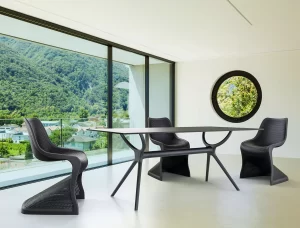

How to Furnish a Boardroom That Works Harder

A boardroom is where decisions are tested, clients are welcomed and teams are expected to focus. Learning how to furnish a boardroom is therefore about more than choosing an impressive table. The room needs to support long meetings, everyday video calls, confidential conversations and the practical realities of cables, documents and frequent use.
For office managers, procurement teams and fit-out professionals, the most successful boardrooms balance authority with comfort. Every piece should look considered, suit the scale of the room and stand up to commercial use without creating a complicated purchasing process.
Start with the boardroom’s real purpose
Before selecting furniture, establish how the room will be used most often. A formal executive boardroom used for quarterly presentations has different requirements to a flexible meeting room used daily by project teams, visiting clients and hybrid workers.
Consider the typical number of attendees, the length of meetings and whether the space must accommodate video conferencing. Also think about who enters the room. A client-facing boardroom should reflect the quality and character of your business, while an internal meeting room may place more emphasis on flexibility, power access and easy reconfiguration.
Room dimensions matter just as much as headcount. Leave enough clearance for people to pull chairs back, walk around the table and access storage without disrupting a meeting. As a practical guide, allow at least 900 mm between the edge of the table and walls, cabinets or other furniture. More space is preferable where the room hosts guests or has frequent foot traffic.
Choose a boardroom table to suit the room
The table sets the visual and functional centre of the boardroom. Its shape affects how people communicate, how many people can sit comfortably and how naturally the room supports presentation screens or cameras.
A rectangular table is a dependable choice for traditional boardrooms. It creates a clear meeting structure, works well in longer rooms and provides a natural position at one end for a screen or presenter. Boat-shaped tables soften the outline while retaining a formal feel, and can improve sightlines between attendees.
For smaller teams, a round or square meeting table can create a more collaborative setting. There is no obvious ‘head’ of the table, which is useful for brainstorming, interviews and regular team catch-ups. However, these shapes are less efficient in narrow rooms and may not suit larger groups.
Select a table size based on seated capacity rather than squeezing in the maximum possible number of chairs. As a rule, allow roughly 600 mm of table edge per person. This gives each attendee reasonable elbow room, space for a laptop and room for notebooks or refreshments. If the boardroom regularly hosts six people but occasionally needs eight, a table designed for eight is usually the better long-term purchase, provided circulation remains comfortable.
Material and finish should also match the workplace. Timber-look finishes bring warmth to corporate interiors and are often easier to integrate with existing joinery. White or light-toned tops can make compact rooms feel brighter, while dark finishes create a more formal presence but may show dust, fingerprints and cable clutter more readily. Commercial-grade laminate is a practical option for high-use rooms, offering a polished appearance with everyday durability.
Plan power and technology before ordering
A good-looking table quickly becomes less effective when leads run across the floor or power boards sit in the middle of the meeting surface. Plan technology early, particularly if staff rely on laptops, presentation screens and video conferencing.
Integrated cable ports, under-table cable trays and accessible power points help keep the room organised. Confirm where floor boxes, wall outlets and data connections sit before finalising table placement. If a fixed central table cannot align with existing services, a wireless charging solution or carefully managed floor cabling may be more practical than costly electrical works.
For hybrid meetings, position the table so cameras capture attendees clearly and screens are visible from every seat. Avoid placing the display directly opposite large windows, as glare can affect both presentations and video calls. Window coverings may be as important as furniture in a room used for online meetings.
Select chairs for comfort, movement and longevity
Boardroom chairs need to look professional, but comfort is not a luxury. A two-hour strategy session feels considerably longer in a chair with poor support, an awkward seat height or limited movement. Comfortable attendees are more likely to remain engaged and make better use of the room.
For a formal setting, upholstered executive-style chairs can add presence and comfort. In more contemporary offices, slimline meeting chairs with supportive padding offer a cleaner, lighter profile. Mesh-backed chairs are well suited to rooms with regular, extended use, particularly in warmer environments where breathability matters.
Choose chair bases according to how the room operates. Castor bases make it easy to move in and out from a larger table and suit rooms that are reconfigured occasionally. Four-leg or sled-base chairs can look more streamlined and reduce rolling movement during formal presentations. If the boardroom doubles as a training space, stackable or lightweight meeting chairs may be worth considering, although they may not provide the same level of comfort for long sessions.
Check chair dimensions against the selected table. Armrests should fit beneath the tabletop where possible, and seat height should suit the table’s clearance. Ordering one sample chair before committing to a full set can prevent a costly mismatch in proportion, finish or comfort.
Add storage without crowding the room
Storage has a place in many boardrooms, but it should support the meeting rather than dominate the interior. A low credenza or buffet unit can hold presentation equipment, spare stationery, catering supplies and confidential documents while providing a useful surface for refreshments.
Choose lockable storage if documents, devices or sensitive materials are kept in the room. In a client-facing boardroom, keep surfaces clear between meetings. A small amount of enclosed storage is usually more valuable than open shelving that collects loose cables, folders and visual clutter.
If the room is compact, consider whether storage can sit just outside the boardroom instead. This preserves circulation and makes the room feel less crowded. In larger spaces, a coordinated credenza can visually anchor the wall behind the presenter or screen.
Use supporting furniture with restraint
The primary furniture should do the hard work: table, chairs and storage. Supporting pieces can improve comfort and function, but only when they serve a clear purpose.
A compact lounge setting near the entrance can create a welcoming waiting area in a generous boardroom, especially for client appointments. A side table may be useful for water, coffee service or materials that need to stay off the main table. In a smaller room, these additions can quickly reduce usable floor space, so prioritise clear access over decorative extras.
Acoustic panels, rugs and curtains can also improve the experience of the room. Hard surfaces such as glass, plasterboard and large tabletops often create echo, making discussions and video calls harder to follow. A commercial-grade rug or acoustic treatment can soften sound while adding texture and colour. Ensure rugs sit safely beneath chairs or outside their movement path so castors do not catch on the edge.
Create a cohesive commercial finish
A boardroom should feel connected to the rest of the workplace. Repeat key colours, materials or finishes from reception, workstations and breakout areas, rather than treating the room as a separate showroom. This does not mean everything must match exactly. A contrast in chair upholstery or table finish can give the boardroom its own identity while still feeling intentional.
Think about maintenance at the selection stage. Pale upholstery can look refined but may need more frequent cleaning in a heavily used room. Timber veneers offer a premium appearance, while laminate finishes may be better suited to businesses that need straightforward care and high resistance to daily wear. The right choice depends on the level of use, the room’s visibility and your cleaning routine.
For larger upgrades, buying commercial furniture from a supplier with Australian-held stock, clear warranty coverage and delivery support can reduce delays during a fit-out. Furniture Pro Australia offers commercial tables, office seating, storage and coordinated furniture options for businesses that need a practical procurement path as well as a polished result.
How to furnish a boardroom without costly mistakes
The common error is selecting furniture on appearance alone, then discovering the table is too large, chairs do not tuck in, or technology has nowhere to go. Measure the room carefully, map door swings and power locations, and mark out the proposed table footprint before placing an order. Masking tape on the floor is a simple way to test circulation and chair clearance.
Avoid underestimating delivery access as well. Check lift dimensions, stairwells, loading areas and the route from reception to the boardroom. A large one-piece table may look ideal online but be impractical for a level-two office with limited access. Modular or flat-packed commercial options can be the more efficient choice in these situations.
The strongest boardrooms do not rely on excess furniture or elaborate styling. They give people enough room to think, talk, present and make decisions with confidence. Start with the meeting table and chairs, plan technology around them, then add only the storage and supporting pieces that make every meeting easier to run.