




Office Cable Management That Keeps Workspaces Clear
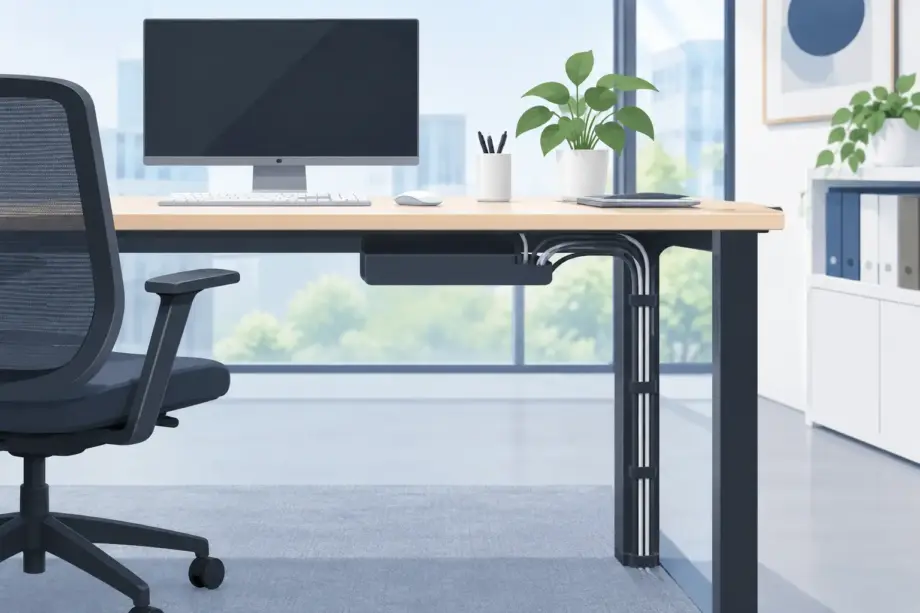
A newly fitted workstation can lose its professional finish quickly when power boards, chargers and monitor leads gather beneath it. Effective office cable management keeps the technology people rely on accessible without making it the first thing clients, staff or visitors notice. It also supports safer movement through shared work areas, simpler cleaning and a more considered workplace presentation.
For office managers, fit-out professionals and business owners, cable management should be planned alongside desks, storage and seating – not treated as a final tidy-up job. The right furniture layout determines where people sit, where equipment connects and whether cables can be contained without creating tension, trip points or hard-to-reach power access.
Why office cable management matters
Cables are part of a functioning workplace. Monitors, docking stations, desk lamps, phones, computers and sit-stand desks all need power or data connections. The goal is not to make every lead disappear completely. It is to create a controlled path from the wall or floor outlet to the workstation, with enough access for daily use and future changes.
In a client-facing office, exposed cords can make even quality furniture look unfinished. In busy teams, loose leads make vacuuming more difficult, collect dust and can be accidentally pulled when someone moves a chair or adjusts a desk. Where cables cross walkways, they may also introduce a genuine safety concern.
A well-managed setup has operational value as well as visual value. When a staff member changes desks, receives a replacement monitor or needs to troubleshoot a dock, labelled and contained cables reduce guesswork. This is particularly useful in flexible offices, reception areas, training rooms and shared hot-desking zones where equipment is regularly moved.
Start with the desk and room layout
The most reliable cable solution begins before desks are installed. Review where power outlets and data points sit in relation to the proposed workstation layout. A desk positioned too far from a wall outlet often leads to extension leads stretched across open floor space, which is difficult to make safe or attractive after the fact.
For banks of desks, choose workstations with a practical route for cables through the frame, modesty panel area or central beam. A cable tray fitted beneath the desktop keeps power boards and excess lead length off the floor while allowing access from a seated or crouched position. This is generally a better long-term option than attaching loose leads individually to the underside of a desk.
In open-plan offices, back-to-back workstations can share a central cable channel. This keeps each desk surface clear and avoids running separate leads around the outside edge of every workstation. For executive offices or compact home offices, a single desk with a rear cable port may be enough, provided it is positioned close to the outlet and does not force cables to bend sharply.
Consider the user’s working position as well. Sit-stand desks need extra cable length and a flexible route that moves safely with the desktop. A cable spine or weighted cable chain can guide leads from the desk to the floor while preventing them from dragging, snagging or becoming visible when the desk is raised. Fixed desks need less movement allowance, but still require space for chairs to roll freely underneath.
Match the solution to the workstation type
There is no single cable management approach that suits every commercial space. A compact reception desk may need concealed access for a phone, EFTPOS terminal and screen, while a design studio might need easy-to-reach outlets for changing equipment. Meeting tables require a different approach again, as visitors need convenient charging without cords crossing the tabletop.
For meeting rooms, integrated power modules or discreet tabletop access points can provide charging where it is needed. Cables can then be directed through a central port and concealed below the table. The trade-off is that built-in solutions should be selected carefully at the planning stage, as retrofitting a finished table may be limited by the tabletop material, frame and available clearance.
In hot-desking areas, standardise the equipment where possible. When every station uses similar monitor arms, docks and power requirements, cable trays can be set up consistently and staff can move with less disruption. A highly customised desk setup may suit specialised roles, but it usually requires more space and more disciplined cable routing.
Build a practical cable pathway
Think of each cable run as a pathway with a clear beginning, middle and end. The beginning is the power or data source, the middle is the concealed route through furniture, and the end is the device connection. Problems occur when cables are added without considering all three points.
Keep power boards off the floor where practical. Mounting them in a cable tray or bracket protects them from cleaning equipment, reduces dust build-up and prevents plugs from being kicked loose. Avoid overfilling a tray. It needs room for heat to dissipate and for staff or technicians to identify and replace individual leads.
Separate power and data cables where the installation calls for it, particularly in higher-use work areas. This makes maintenance easier and helps keep the arrangement orderly. Use cable ties or reusable hook-and-loop straps to group leads lightly, rather than pulling them tightly into one bundle. Cables need a little movement, especially near plugs, monitor arms and adjustable desks.
Floor cable covers can be useful when power must cross a short open area, such as between a meeting table and a wall outlet. They are a practical compromise, not the first choice for a permanent fit-out. Select a low-profile cover that suits the floor surface, sits securely and does not create a raised obstacle at an entry point or major walkway.
Avoid the common shortcuts
The quickest fix is often the one that causes problems later. Running a power lead underneath a loose rug, daisy-chaining power boards or taping cables directly to the floor can make cleaning, maintenance and safety checks more difficult. Likewise, forcing excess cable into a tight desk drawer creates a cluttered space that is hard to inspect and may interfere with drawer operation.
Another common issue is using a cable port as a storage point for every lead. A single grommet can look neat from above, but it can become crowded below the desk. Pair desktop ports with a tray or channel so cables have somewhere controlled to go once they pass through the work surface.
Plan for cleaning, changes and maintenance
Office furniture is selected for years of service, while technology can change far more frequently. A cable arrangement that looks perfect on installation day should also allow a monitor, laptop dock or phone system to be replaced without dismantling the entire workstation.
Leave sensible access to power boards and connection points. Label both ends of critical leads in larger offices, particularly where multiple monitors and docks are installed. It is a small step that can save significant time when IT support needs to identify a device quickly.
Cleaning teams also benefit from clear cable containment. Raised power boards, cable trays and unobstructed floor areas make it easier to vacuum around desks without catching cords or moving equipment. In hospitality administration areas, reception zones and shared offices, this contributes to a cleaner presentation every day rather than only before a client visit.
Review cables when the furniture layout changes. Moving desks closer together, adding a storage unit or reconfiguring a team area can pinch leads or leave them too short. If your office is growing, allow capacity in the original plan for additional monitors, chargers and workstations rather than rebuilding the cable system each time.
Choose furniture that supports a clean finish
A desk should support the way the business works, not merely provide a flat surface. When selecting office desks and workstations, look beyond dimensions and finish to consider cable ports, under-desk clearance, modesty panels, shared workstation beams and compatibility with cable trays. These details can make the difference between an office that stays orderly and one that needs constant attention.
Furniture Pro Australia helps commercial buyers coordinate desks, storage, ergonomic seating and workstation layouts with the practical needs of modern office equipment in mind. For a straightforward office refresh or a larger fit-out, selecting compatible furniture from the outset reduces the need for makeshift cable fixes after delivery.
The strongest result is usually the least noticeable: a clear desktop, open floor space, accessible power and furniture that looks intentional from every angle. Plan the cable route with the same care as the desk layout, and the workspace will be easier to use, maintain and present with confidence.